Weather Integration
Outfit suggestions are weather-aware. The app pulls live weather data for your location and uses it to decide what items are appropriate: layers, outerwear, footwear, and fabric weight.
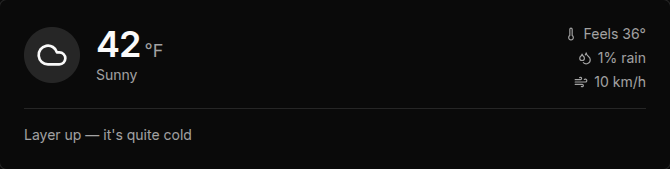
The Weather Card
The weather card at the top of the suggest page shows:
- Temperature: Current temp in your preferred unit (C or F).
- Feels like: Adjusted temperature accounting for wind chill or humidity.
- Precipitation chance: Percentage chance of rain or snow.
- Wind speed: In km/h or mph depending on your unit setting.
- Condition: A label like “Partly cloudy,” “Heavy rain,” or “Clear.”
This data comes from Open-Meteo using your saved location. It refreshes each time you open the suggest page.
Weather Override
If you want to generate a suggestion for different conditions (e.g., planning tomorrow’s outfit or dressing for a different city), you can override the weather.
Click the override button on the weather card to expand the override panel:
- Condition buttons: Clear, Partly cloudy, Cloudy, Rainy, Snowy, Windy. Click one to override the condition.
- Temperature slider: Drag to set a custom temperature. The slider range covers your configured units.
Overrides apply only to the current suggestion session. Refreshing the page restores the live weather data.
How Weather Affects Suggestions
| Condition | AI behavior |
|---|---|
| Cold (below 10°C / 50°F) | Prioritizes layering, outerwear, warm fabrics (wool, fleece). Avoids light fabrics and shorts. |
| Hot (above 25°C / 77°F) | Prioritizes breathable fabrics, lighter colors, minimal layers. Avoids heavy outerwear. |
| Rain | Adds waterproof outerwear where available. Avoids suede, canvas shoes, and light fabrics. |
| Wind | Favors fitted silhouettes and wind-resistant outerwear. |
| Mild (10-25°C / 50-77°F) | Full wardrobe considered. Layer suggestions are optional, not required. |
Temperature Sensitivity
In Style Preferences, you can adjust your temperature sensitivity. Some people run warm and don’t need a coat until it’s very cold. Others layer up early. The sensitivity setting shifts the temperature thresholds the AI uses when deciding whether to include outerwear and layers.
Mobile: The suggest tab on mobile shows the same weather card. Weather data refetches each time you navigate to the suggest tab, so it stays current throughout the day.