Wardrowbe Now Speaks Your Language — 6 Languages Live

I've been shipping features for months now in English only, and that always felt like a limitation I wanted to fix. Wardrowbe is a wardrobe app. Clothes are universal. The language you think in shouldn't determine whether you can use it or not.
So today, Wardrowbe is fully available in six languages. Both the web app and the iOS mobile app now support:
| Language | Locale | Native Name |
|---|---|---|
| English | en | English |
| French | fr | Français |
| Japanese | ja | 日本語 |
| Korean | ko | 한국어 |
| Chinese (Simplified) | zh-CN | 中文简体 |
| Chinese (Traditional) | zh-TW | 中文繁體 |
Everything is translated. Navigation, buttons, labels, outfit suggestions, settings, error messages, even the constants like garment types and formality levels. This isn't a half-baked Google Translate pass. Every string was reviewed for context and natural phrasing.
How to Switch Languages
On the web, there's a language selector right in the header. Click it, pick your language, and the entire interface reloads in your chosen locale. Each option shows the country flag and the language's native name, so you can find yours even if the current UI is in something you can't read.
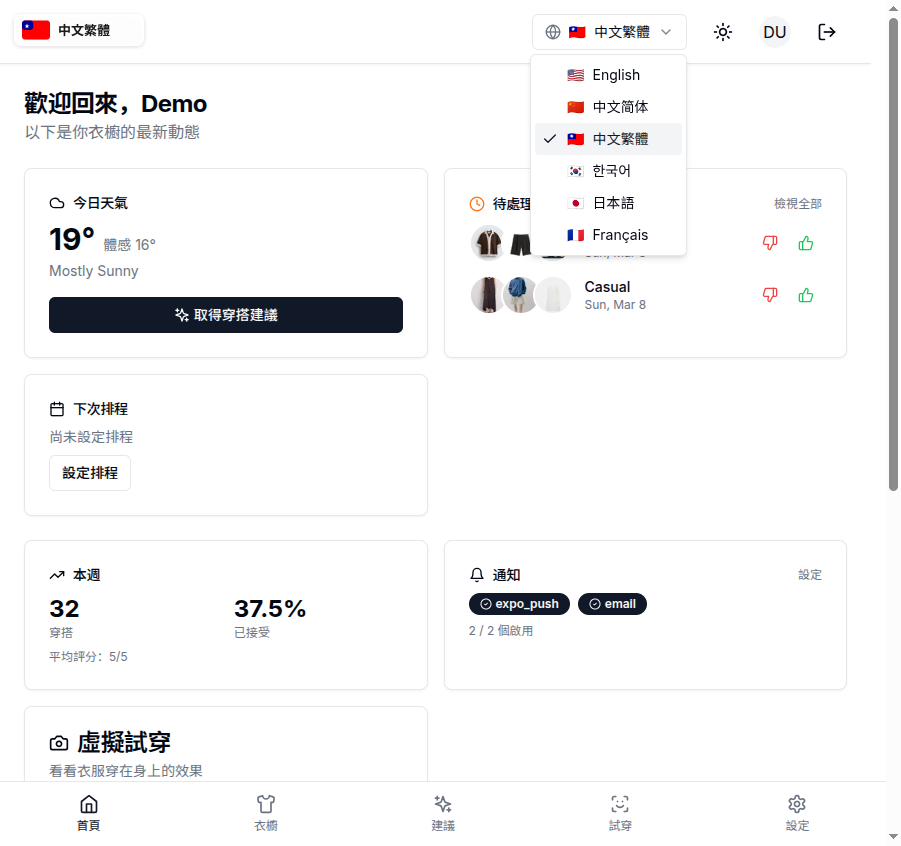
On mobile, go to Settings and tap Language. Same list, same flags, same instant switch. Your preference is saved locally on your device and synced to your account, so it persists across sessions and platforms.
The self-hosted version will be getting i18n support soon. Once published, the translations will be bundled with the app, no cloud service needed.
Every Screen, Fully Translated
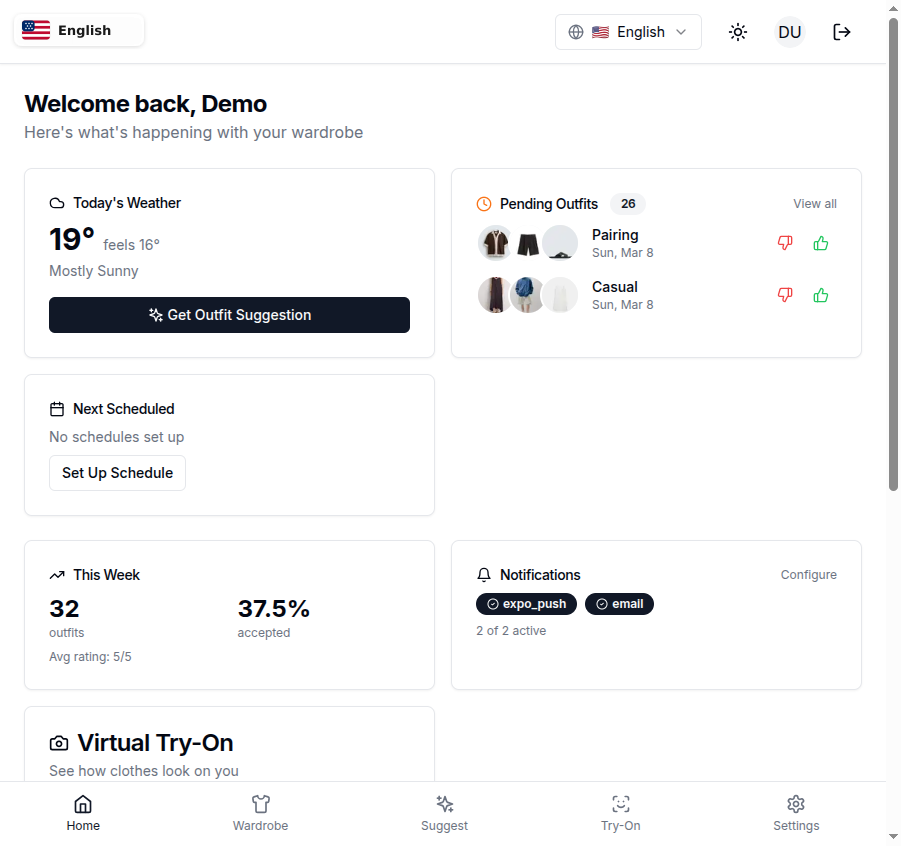
This isn't just the nav bar. Every page in the app is localized. Here's what the dashboard looks like in English. Weather, pending outfits, weekly stats, notifications, virtual try-on. All in your language.
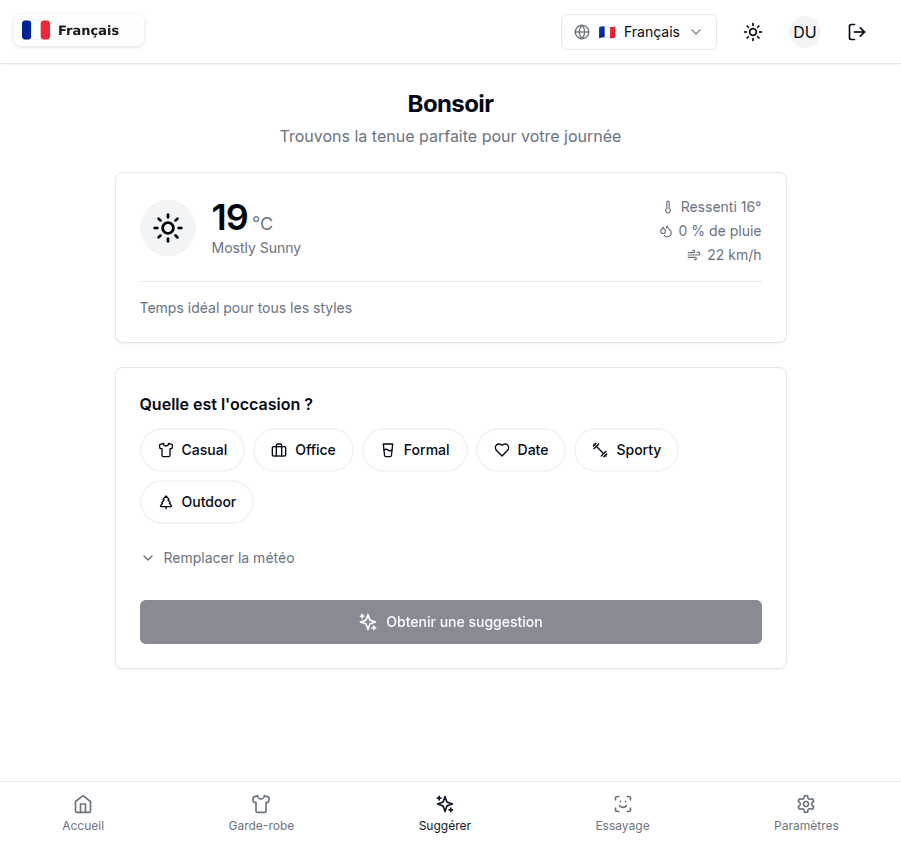
And here's the outfit suggestion page in French. "Bonsoir. Trouvons la tenue parfaite pour votre journée." The weather card, the occasion picker, the "Obtenir une suggestion" button. Everything reads naturally, not like it was run through a dictionary.
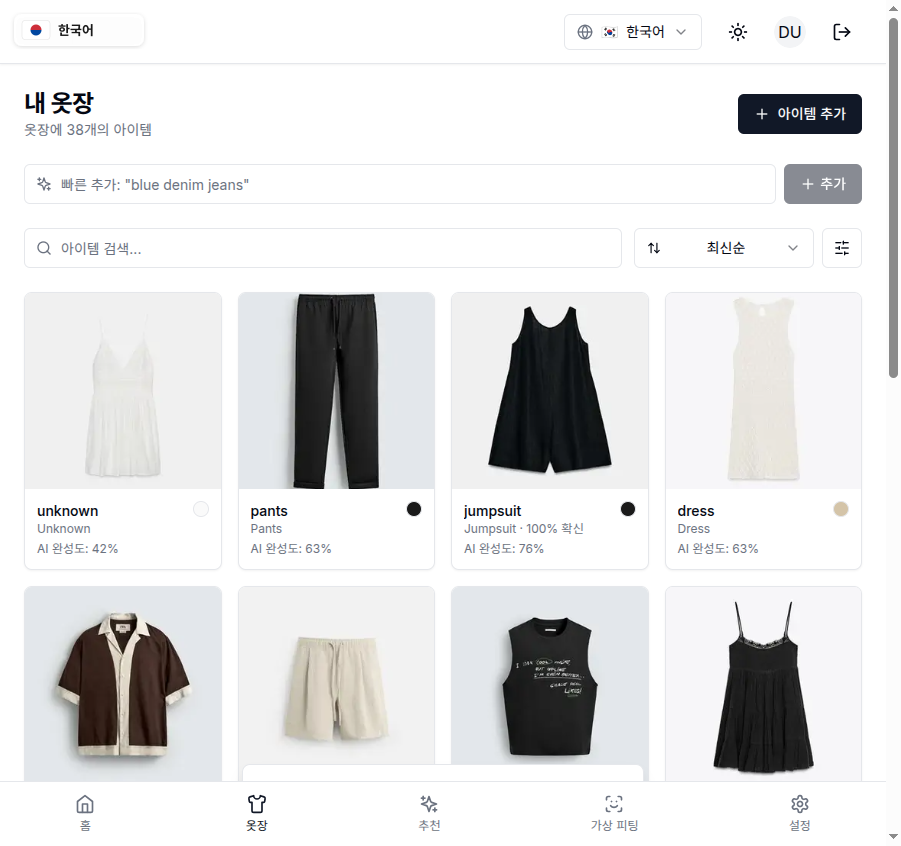
The wardrobe grid in Korean. Item labels, AI completeness scores, search placeholder, filter options, even the "Add Item" button. All 38 items with their metadata rendered in Korean.
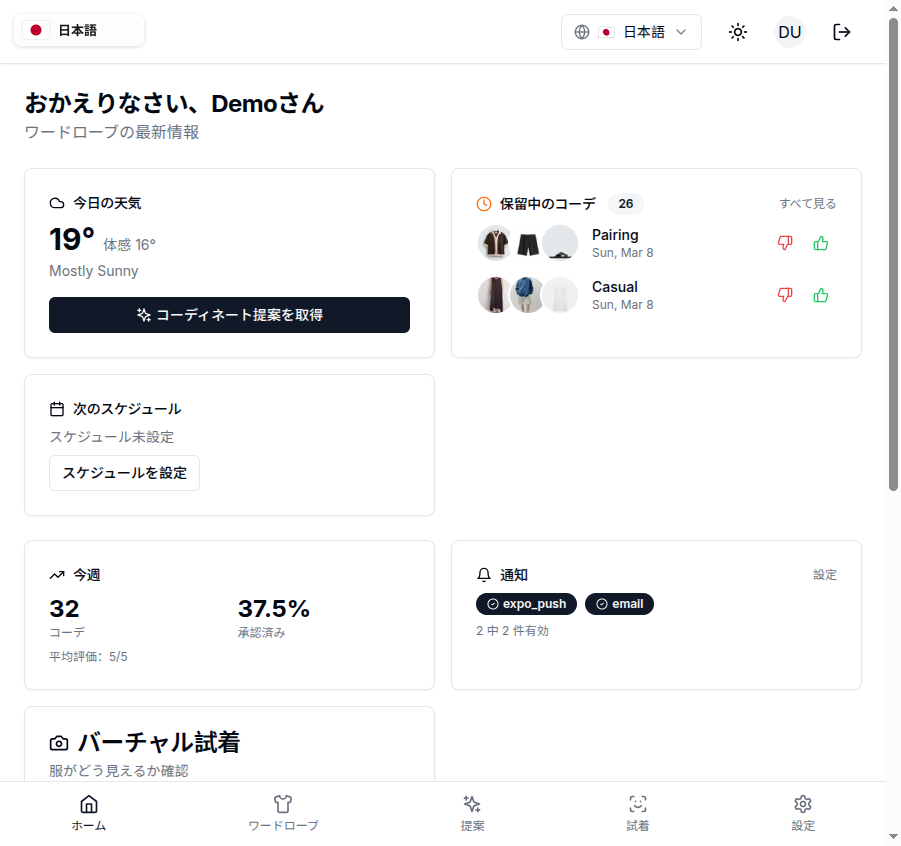
And the Japanese home screen. "おかえりなさい、Demoさん" (Welcome back, Demo). Weather in Japanese, pending outfits, schedule section, virtual try-on. The bottom navigation tabs too: ホーム, ワードローブ, 提案, 試着, 設定.
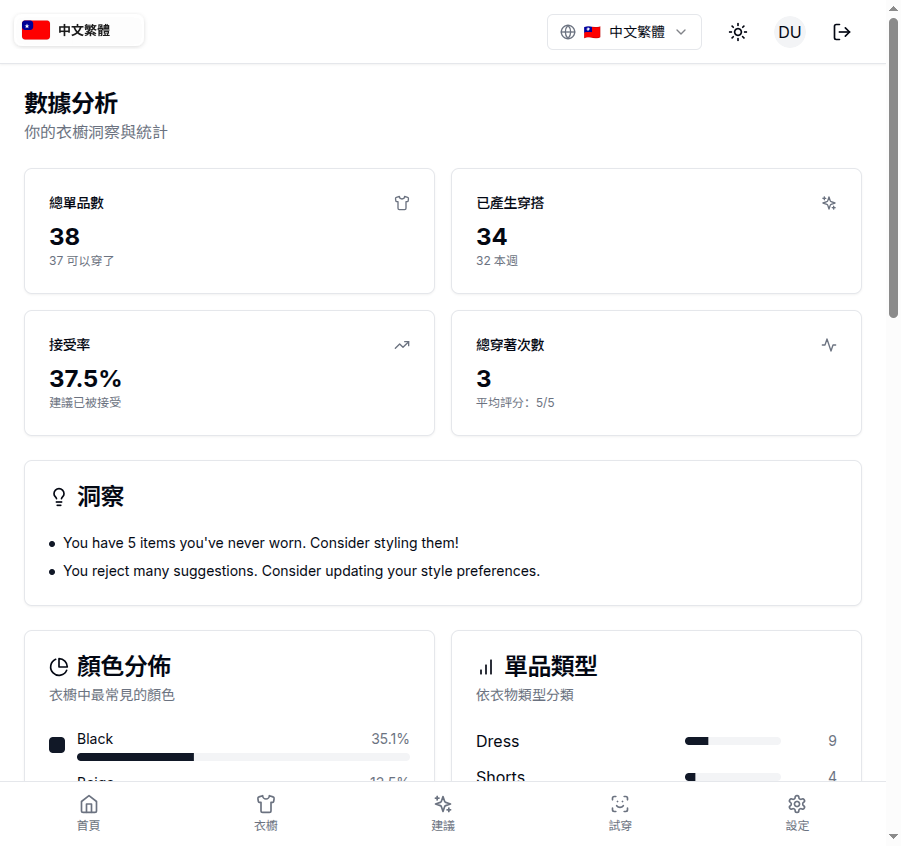
Analytics in Traditional Chinese is one I'm particularly proud of. "數據分析" (Data Analytics), "總單品數" (Total Items), "接受率" (Acceptance Rate), "顏色分佈" (Color Distribution). These aren't obvious translations. Getting them right required understanding the domain, not just the dictionary definition.
What Actually Gets Translated
Basically everything you see on screen. Here's the breakdown:
- Navigation — all tabs, menu items, breadcrumbs
- Wardrobe management — add item, edit, filters, sort options, AI completeness indicators
- Outfit suggestions — the "Get Suggestion" flow, weather context, occasion picker, feedback prompts
- Virtual try-on — credit counts, upload prompts, processing states
- Settings — every label, every description, every toggle
- Billing — subscription status, plan names, trial info
- Family features — invites, ratings, shared wardrobe labels
- Analytics — chart labels, insight descriptions, time periods
- Notifications — channel names, schedule descriptions
- Error messages — so you know what went wrong in your own language
- Constants — garment types (shirt, pants, dress), colors, formality levels, occasions
That last one matters more than you'd think. When the AI tags a clothing item as "semi-formal cotton blazer," those words appear througout the app in filters, suggestions, and history. Having them translated means the whole experience feels native, not patched together.
Pluralization and Context
One thing I learned building this: translation isn't just swapping words. Different languages handle plurals, counts, and context completely differently.
English: "3 items." Simple.
Japanese doesn't pluralize the same way. French has gendered articles. Korean has different counting systems depending on what's being counted. Chinese doesn't inflect for number at all.
Wardrowbe handles all of this with proper plural rules and context-aware interpolation. "1 item" vs "5 items" in English becomes the appropriate form in every other language. A string like {count} credits remaining adapts correctly whether you're looking at it in French ("crédits restants") or Korean ("크레딧 남음").
The translation system supports ICU MessageFormat, which means complex plurals like {count, plural, one {# credit} other {# credits}} just work. Each language defines its own plural rules, so languages with more than two plural forms (like some Slavic languages, if we add them later) are already supported by the infrastructure.
Why These Six Languages
Practical reasons. I looked at where Wardrowbe's users and traffic actually come from. English is the baseline. French covers a significant portion of European users. Japanese, Korean, and both Chinese variants cover the East Asian market where fashion apps have massive adoption.
These aren't random picks. They represent the largest user segments that were bouncing because the interface was in a language they didn't speak fluently.
More languages will come. If there's demand for Spanish, German, Portuguese, or others, the infrastucture is ready. The entire translation system is modular. Adding a new language means creating one set of translation files, not rewriting code.
One Codebase, Two Platforms
Here's a detail I'm particularly happy with: the translations live in a single shared package used by both the web app and the mobile app. One source of truth. When I fix a translation or add a new string, it's available everywhere. No copy-pasting between codebases, no drift between platforms.
The web app detects your browser's language automatically and defaults to the closest match. The mobile app checks your device language. Both fall back to English if no match is found. And both let you override the automatic detection manually whenever you want.
This also means cross-platform sync works seamlessly with i18n. Switch your language on mobile, your preference follows when you log in on the web. Your wardrobe items, outfit history, and AI learning profile all work regardless of which language you're using.
The translations are organized into 18 semantic namespaces, one for each feature area (wardrobe, suggestions, settings, billing, analytics, and so on). This keeps the files manageable and means the app only loads the translations it needs for the current page.
For Self-Hosted Users
i18n support is coming soon to the self-hosted version. If you're running Wardrowbe on your own server, whether on a Raspberry Pi, NAS, or VPS, you'll get the same six languages once the translation package is published to the open-source repo.
When it lands, the translations will be bundled at build time. No external API calls for localization, no third-party translation services, no data sent anywhere. Your language preference, like everything else in the self-hosted version, will stay entirely on your hardware.
What's Next
Six languages is a solid start, but the goal is to cover every major language where users are asking for support. Spanish, Portuguese, and German are high on the list. Arabic and Hebrew would require right-to-left layout support, which the architecture already accounts for (every locale has a text direction flag built in).
If you speak a language that isn't supported yet and want to help translate, reach out. The translation files are structured JSON, not rocket science. A native speaker can review and contribute without touching any code.
Try It Now
Switch your language on the web app or update the mobile app from the App Store. The language selector is right there in the header.
If you haven't tried Wardrowbe yet, it's a wardrobe manager with AI-powered outfit suggestions based on your actual clothes, local weather, and personal style. See how it works, check pricing, or try the demo in any of the six supported languages.
Self-hosted users can follow the GitHub repo for when i18n support drops. It's coming soon.